
How to play Alien Attack
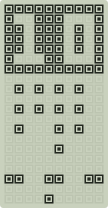
Rows of aliens march from side to side, stepping down each time they reach the edge and dropping bombs as they go. Move the cannon with Left and Right and fire with Action or Up — only one shot can be in the air at a time. Shelters protect you but crumble under fire from both sides, and a saucer sometimes crosses the top for bonus points. If the aliens reach your cannon, the game is over.
Controls
- ←↑→↓
- Move, steer, choose a game in the menu
- Space
- Action: rotate, fire, jump
- 2
- Start / Pause
- 3
- Sound on / off
- 1
- On / Off: back to the menu
In the menu, Up and Down pick a game, Left sets LEVEL, Right sets SPEED and Start begins.
On a phone or tablet, tap the buttons of the console on the screen.
Speed and level
SPEED and LEVEL go from 1 to 10. You set them in the menu before the game starts; they also rise as you play. The higher they are, the faster the game — and the more points each action is worth.
Tips
- Clear whole columns at the edges to slow the fleet's descent.
- The fewer aliens remain, the faster they march — stay alert.
Alien Attack: questions and answers
Is Alien Attack free?
Yes. Alien Attack is completely free: open the page, press Play and the game starts in your browser with no download.
Can I play Alien Attack on my phone?
Yes. The console works on phones and tablets — tap the buttons on the screen. On a computer you can play with the keyboard.
How do I get on the Alien Attack leaderboard?
Sign in with Google, choose a nickname and play. Your best score is added to the daily, weekly and all-time tables of Alien Attack.